Android Multi Tool Fix Bootloop Frp Lock And Flashing Errors Easily
When Your Phone Gets Stuck With Frp Auth Errors Or Flashing Problems It Can Feel Really Stressful And Confusing. You Might Have Tried Different Tools Watched Videos And Still Ended Up With The Same Error Again And Again Which Is Why Many People Start Searching For Android Multi Tool Hoping For A Real Solution.
In This Post You’ll Learn How Android Multi Tool Helps With Infinix / Tecno / Itel Mediatek Auth Spreadtrum Auth Oppo / Oneplus / Realme Secracy Decrypt And Demo Remove Vivo Qualcomm / Mediatek Auth Nokia Fastboot Hmd Auth Xiaomi Edl / Brom And Fastboot To Edl Auth Mi Assistant Frp Auth And Transsion Anti Crack Fix. We’ll Explain What These Options Mean And How They Can Help You Fix Common Phone Problems Step By Step So You Can Choose The Right Method And Move Forward With Confidence.
What Is Android Multi Tool And How It Works
Android Multi Tool Is An All-in-one Phone Repair Software Designed To Handle Unlocking Flashing Frp Removal And System Repair. It Supports Adb Fastboot Edl And Brom Modes Which Allows Access Even When The Phone Does Not Boot.
The Tool Communicates Directly With The Device Chipset And Security Layers. This Makes It Possible To Bypass Authorization Blocks And Perform Deep-level Repairs That Normal Tools Cannot Handle.
Infinix / Tecno / Itel Mediatek Auth Support
Most Transsion Devices With Mediatek Processors Block Flashing Without Proper Authorization. This Security Stops Firmware Writing And Frp Removal.
Mediatek Auth Unlocks Communication Between The Tool And The Phone. It Allows Flashing Frp Reset And Recovery Of Dead Or Bootloop Devices Safely.
Infinix / Tecno / Itel Spreadtrum Auth Features
Spreadtrum Chipset Phones Also Require Special Permission Before Repair Tasks. Without Auth Tools Fail To Access Partitions.
This Feature Enables Stable Flashing And Unlocking On Spreadtrum Devices. It Reduces Handshake Errors And Failed Connection Problems.
Oppo / Oneplus / Realme Secracy Decrypt Function
Many Oppo-based Phones Use Encrypted Partitions That Block Firmware Installation. This Encryption Prevents Full Flashing.
Secret Decrypt Removes Encryption Barriers So Firmware Can Be Written Correctly. It Helps Fix Update Failures And Corrupted System Files.
Oppo / Oneplus / Realme Demo Remove Option
Demo Phones Are Locked With Store Restrictions And Cannot Be Used Normally. Reset Does Not Remove Demo Mode.
Demo Removal Converts Display Units Into Fully Usable Phones. This Is Useful For Repair Shops And Resale Purposes.
Oppo / Oneplus Mediatek Auth Access
Oppo And Oneplus Mediatek Models Require Server Authorization For Flashing. Without It Flashing Tools Stop At Verification.
This Feature Allows Flashing And Frp Removal Without Official Login. It Speeds Up Repair Work And Reduces Service Costs.
Realme Mediatek Auth Capability
Realme Applies Strong Security On Mediatek Devices That Blocks Flashing And Unlocking.
With This Auth Firmware Installation And System Recovery Become Possible. It Helps Repair Bootloop And Soft-brick Cases.
Nokia Fastboot Hmd Auth Support
Nokia Phones Require Hmd Permission During Fastboot Flashing. Without Auth Partitions Cannot Be Written.
This Option Allows Frp Reset And Firmware Flashing In Fastboot Mode. It Helps Restore Phones Stuck After Failed Updates.
Vivo Qualcomm / Mediatek Auth Function
Vivo Locks Both Qualcomm And Mediatek Devices With Strong Security. Edl And Flashing Are Blocked Without Authorization.
This Feature Allows Deep Repair Flashing And Frp Reset. It Helps Fix Recovery Loop And System Crash Problems.
Xiaomi Edl / Brom Auth Bypass
Xiaomi Restricts Edl Mode Without Mi Authorization. This Prevents Full Firmware Flashing On Hard-bricked Phones.
With Edl And Brom Auth You Can Flash Firmware Without Server Approval. It Is Very Helpful For Dead And Unbootable Devices.
Xiaomi Fastboot To Edl Auth Feature
Some Xiaomi Phones Only Connect In Fastboot Mode But Full Flashing Needs Edl Access.
This Feature Safely Switches The Phone From Fastboot To Edl. After That Full Firmware Installation Becomes Possible.
Xiaomi Mi Assistant Frp Auth Removal
Mi Assistant Frp Lock Blocks Phone Setup After Reset. Even Correct Login May Fail Due To Sync Errors.
This Option Removes Frp Through Mi Assistant Communication. It Allows Normal Setup And Phone Access Again.
Transsion Anti Crack Fix Auth System
After Flashing Some Transsion Phones Show Anti-crack Warnings And Network Issues.
Anti-crack Fix Repairs System Security Mismatch And Restores Normal Operation. It Prevents Shutdown And Signal Problems.
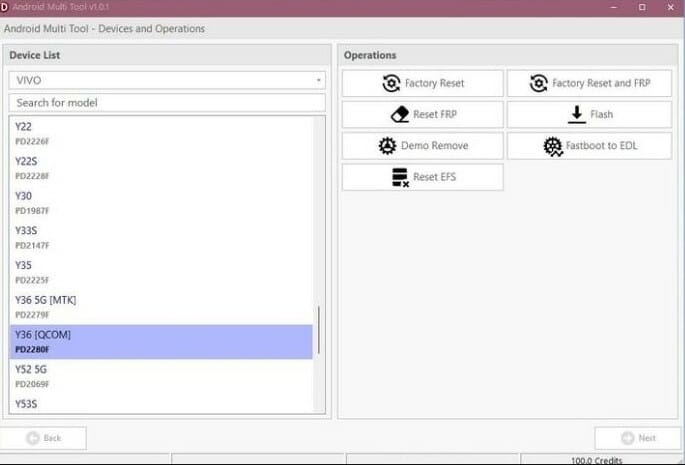
How To Use Android Multi Tool Safely
Install All Usb Drivers Before Connecting Your Device. Then Boot Your Phone Into The Required Mode Such As Fastboot Edl Or Brom.
Open The Tool Select Brand And Authorization Option And Start The Process. Always Wait For Completion Message Before Disconnecting.
System Requirements And Compatibility
The Tool Runs Best On Windows Systems With Proper Drivers Installed. Antivirus May Block Files So Temporary Disable May Be Needed.
It Supports Many Android Versions And Security Patches. Always Match Firmware With Exact Model Number.
How To Download Gsm Tools Safely
To Download Gsm Tools Search The Exact Tool Name With “Latest Version Download” On Google And Choose A Trusted Gsm Website That Shows Proper Tool Details. Download The Zip File Extract It On Your Pc Run The Tool As Administrator And Install The Required Usb Drivers If Your Device Is Not Detected.
Why Technicians Prefer Multi-brand Tools
Using One Tool Saves Time Storage And Training Effort. You Don’t Need To Learn Many Different Software Programs.
Updates Add New Models And Fixes Making The Tool Useful Long-term. This Improves Productivity In Repair Shops.
Is Android Multi Tool Suitable For Beginners
The Interface Is Simple And Options Are Clearly Labeled. Basic Users Can Perform Frp Removal And Demo Unlock Easily.
However Flashing Should Be Done Carefully. Beginners Should Verify Firmware And Device Model Before Starting.
Final Verdict
If You Work With Phone Repair Or Unlocking This Software Can Save Hours Of Work. It Combines Authorization Flashing And Recovery In One System.
With Android Multi Tools Download You Get Mediatek Spreadtrum Qualcomm Fastboot And Edl Solutions Without Switching Tools. It Is A Strong Choice For Both Beginners And Professionals.